How to Configure Your Link Preview for Higher Social Engagement
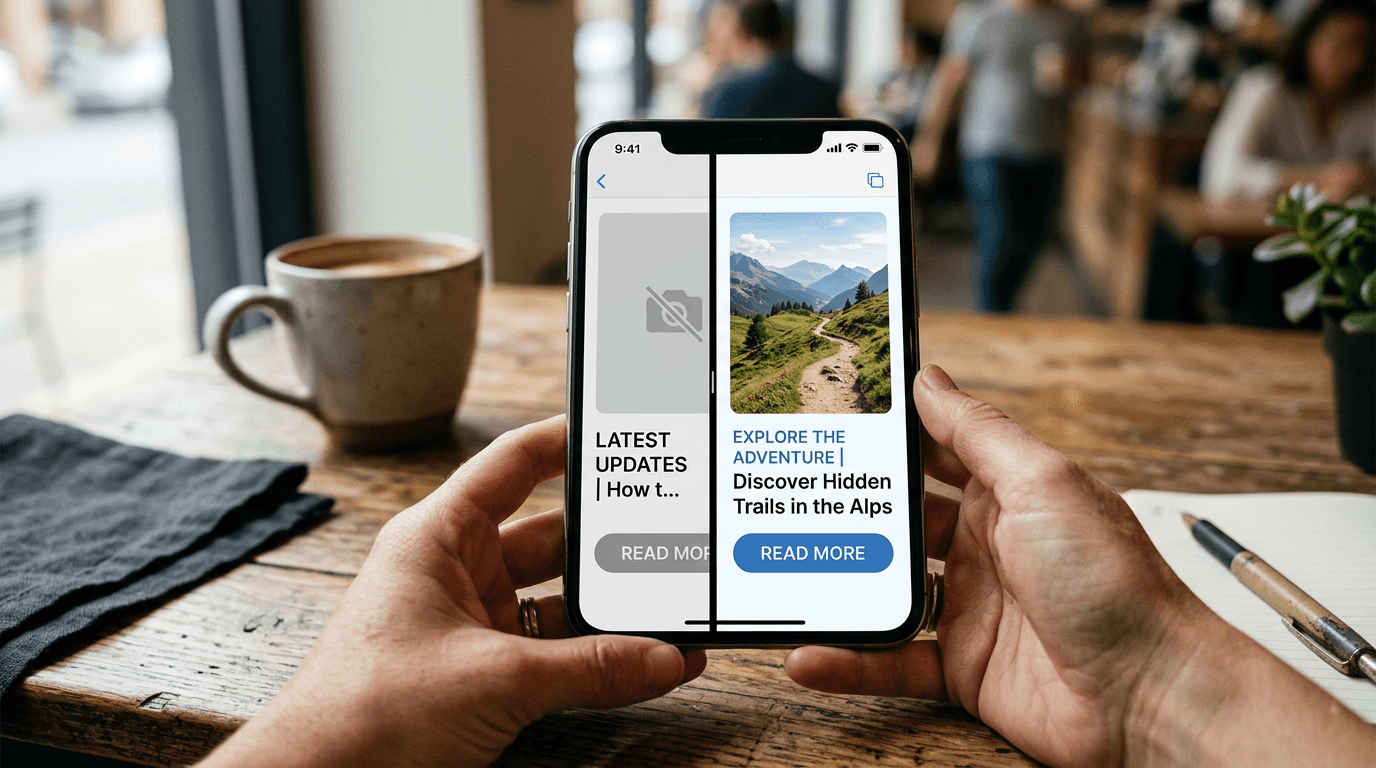
You paste a campaign URL into a social media scheduling tool, expecting a vibrant feature image and a crisp, compelling headline. Instead, the platform generates a gray placeholder square and a broken string of raw domain text. That broken link preview kills the click-through rate before the post even goes live. Platforms prioritize native content, meaning any outbound destination must fight for user attention. When the metadata fails, the visual real estate shrinks, and users scroll past.
Quick Summary
A link preview is the visual card generated by a social platform when a URL is shared, built from the destination page's metadata. Optimizing this card requires configuring Open Graph tags, ensuring image dimensions meet platform standards, and testing through native debuggers.
- Open Graph (OG) tags dictate the title, description, and image.
- Scrapers require specific image aspect ratios, usually 1.91:1, to prevent cropping.
- Link embedder tools centralize routing but require strict metadata alignment.
- Platform caches hold old metadata until manually cleared via debuggers.
Table of Contents
- 1. Configure Open Graph Metadata
- 2. Set Up a Centralized Link Embedder
- 3. Design the Embedded Link Presentation
- 4. Implement Persistent Tracking Parameters
- 5. Force Platform Parsers to Refresh
- Common Pitfalls & Troubleshooting
- FAQ
- Recommended Reads
1. Configure Open Graph Metadata
Social platforms do not read your website the way a human does; they send automated scrapers to read the <head> section of your HTML. The Open Graph protocol standardizes this communication. To generate a functional preview, you must explicitly define the og:title, og:description, and og:image tags.
The mechanism relies on absolute clarity. If a scraper finds conflicting tags or relative image URLs (like /images/cover.jpg instead of https://example.com/images/cover.jpg), it abandons the attempt and falls back to whatever raw text it can scrape from the body. The image itself carries strict requirements: it must sit securely under 8MB, and to avoid awkward cropping across Twitter, LinkedIn, and Facebook, it requires a 1.91:1 aspect ratio (typically 1200 x 630 pixels).
The mistake people actually make here is relying on their Content Management System (CMS) to auto-generate the description from the first paragraph of the page. The first paragraph often contains navigation text, cookie warnings, or introductory filler that truncates awkwardly at 60 characters. You must write a dedicated, standalone og:description that functions as a call to action. If the metadata does not persuade the user to click, the technical implementation is wasted.
2. Set Up a Centralized Link Embedder
When managing traffic from platforms that restrict outbound routing, such as Instagram or TikTok, a single bio URL is often the only exit point. A link embedder acts as a centralized routing hub, allowing you to host multiple destinations behind one primary domain.
This setup works by capturing the initial click and loading a mobile-optimized landing page containing an array of destination buttons. The trade-off here is the extra click required from the user. To mitigate this friction, the landing page must load instantly. Every millisecond delay increases bounce rates.
The mistake users make when configuring these hubs is overloading them with rich media. They embed YouTube players, Spotify playlists, and heavy animated GIFs directly into the routing page. This creates a bloated page that crashes in-app browsers on older mobile devices. A routing hub should be lean. Use static images and clean typography to guide the user to the final destination, rather than trying to host the entire experience on the intermediary page.
3. Design the Embedded Link Presentation
Once the user reaches your site or your routing hub, the way you present outbound destinations dictates whether they continue the journey. An embedded link must communicate trust and destination clarity. Users hesitate when they cannot predict what a tap will do.
The mechanics of this involve visual hierarchy. A clickable link needs to look distinctly interactive, utilizing contrasting colors, hover states (for desktop), and clear iconography. Adding an external-link icon next to the text provides an immediate visual cue that the user is about to leave the current domain. This transparency reduces bounce rates on the destination page because the user arrives intentionally.
The common mistake is disguising the destination. Designers often strip away underlines and standard blue coloring to make the link blend into a minimalist aesthetic, or they style outbound links exactly like native site navigation. When an embedded link looks identical to a native menu button, users click expecting a seamless internal page load. When they are unexpectedly thrown to a third-party checkout or external portfolio, the jarring context switch causes them to immediately close the tab.
4. Implement Persistent Tracking Parameters
You cannot optimize what you cannot measure. When a user clicks a preview card on social media, the referral data is often stripped by the platform's in-app browser or privacy protocols. Relying on default Google Analytics referral traffic will result in massive buckets of "Direct" or "Unknown" traffic, blinding you to which specific post drove the engagement.

The solution is appending Urchin Tracking Module (UTM) parameters to the URL before generating the preview. By defining utm_source, utm_medium, and utm_campaign, you force the analytics platform to categorize the click correctly, regardless of how the browser handles the referral header.
The fatal mistake in this step happens during redirection. Many setups use vanity short-links that redirect to the final long-form URL. If the server handling that redirect is not explicitly configured to pass query strings to the final destination, the UTM parameters are stripped the moment the redirect executes. You get the click, but the data is lost. Always verify that your redirect rules append the original query string to the target URL.
5. Force Platform Parsers to Refresh
Social networks handle billions of URLs daily. To manage server load, they aggressively cache metadata. When a URL is shared for the first time, the platform scrapes the Open Graph tags, stores them in its own database, and serves that cached version to every subsequent user who shares the link.
This mechanism creates immense frustration when you discover a typo in your headline or an incorrectly sized image. You fix the HTML on your server, paste the link into a new social post, and the old, broken preview still appears. The platform is not looking at your live site; it is looking at its cache.
Practical rule: Always run your final URL through a platform's native sharing debugger before publishing the post, even if you are certain the tags are correct.
The mistake is assuming a cache clears itself quickly. It does not. You must manually force the platform to scrape the page again. Use the Facebook Sharing Debugger, the LinkedIn Post Inspector, or the Twitter Card Validator. Entering your URL into these tools and clicking "Scrape Again" forces the platform's servers to fetch the live HTML, overwrite the cached database entry, and generate the updated preview.
Common Pitfalls & Troubleshooting
When a link embed fails, the symptoms often look identical to the user, but the root causes require entirely different technical interventions.
Symptom: The preview generates a gray box instead of the designated image.
This is the most frequent failure. The cause is almost always server-side blocking. Security plugins or firewall rules often block requests from known bot user-agents to prevent scraping. Because social media parsers are technically bots, your server rejects their request to download the image. The fix is to whitelist the specific user-agents used by Facebook, LinkedIn, and Twitter in your server's .htaccess file or firewall settings.
Symptom: The preview displays an outdated headline or description.
As covered in the caching section, this is a database issue on the social platform's end, not a failure of your website. The platform scraped the URL before you finalized the metadata. The fix is never to wait it out. You must input the exact URL into the specific platform's developer debugger tool and manually trigger a re-scrape.
Symptom: The link embed fails to load entirely on mobile devices, showing a blank space.
This occurs when you use a JavaScript-heavy third-party embed code rather than standard Open Graph tags. In-app browsers (like the one inside the Instagram app) have strict security limitations and often block external scripts from executing. The fix is to abandon the script-based embed and revert to standard HTML metadata, ensuring the destination page is fully responsive without relying on client-side rendering to display basic routing information.
FAQ
Why does my link preview look different on LinkedIn compared to Twitter?
Each platform maintains its own parser and fallback rules. While they all read Open Graph tags, Twitter prioritizes its proprietary twitter:card tags. If those are missing, it falls back to OG tags, but it may crop the image differently based on its UI requirements.
Can I change the preview image without changing the image on the actual webpage?
Yes. The og:image tag operates independently of the <img> tags in your page's body. You can specify a hidden, optimized image URL in the metadata specifically designed for social sharing, while keeping the visible page design intact.
How long does a social platform cache my metadata?
Platform caching durations vary wildly, from 7 days to 30 days, depending on the network's internal policies and the overall engagement volume of the URL. Never rely on time to clear a cache; always use a debugger tool.
Does a URL shortener break my link preview?
It depends on the shortener's configuration. A properly configured 301 redirect will pass the scraper through to the final destination to read the metadata. However, if the shortener uses an iframe or a JavaScript redirect, the scraper will fail to reach the final page, resulting in a broken preview.